Woocommerce : Using a third party API to get prices of products after user choosing options
I'm a printer shop reseller, and I have a wordpress/woocommerce store with YITH product add-ons. every product has more or less then 7 options to choose from. The customer can choose the product he wants and then choose from the options.
The problem : is that the prices are very "random", not every option has a specific amount of money. For ex : if you choose a paper size A4, the price of printing the both sides is 1$. but if you choose paper size A5, the price is 5$, and if you choose a specific type of paper the price of printing the both sides is 19$ -_-.
So i must use the API of my supplier to get the prices,
Here is the API doc link : https://media.realisaprint.com/documents/rea-api/2.1/api_realisaprint_com_v2_1.pdf
How to do it : I will get all the options and send them via a post request via an URL and show the results (JSON).
But i don't know how to do it technically, can I use hooks and filters in my functions.php ? if yes which hook ?
can any one make any suggestions to explore ?
Thank you very much.
Solutions
There are certain pre-built functions and methods in Wordpress and Woocommerce. There are certain functions you can call to use to pull data directly from an order.
I would recommend installing Woocommerce Cost of Goods Plugin - https://docs.woocommerce.com/document/cost-of-goods-sold
Code Example in your theme's functions.php file
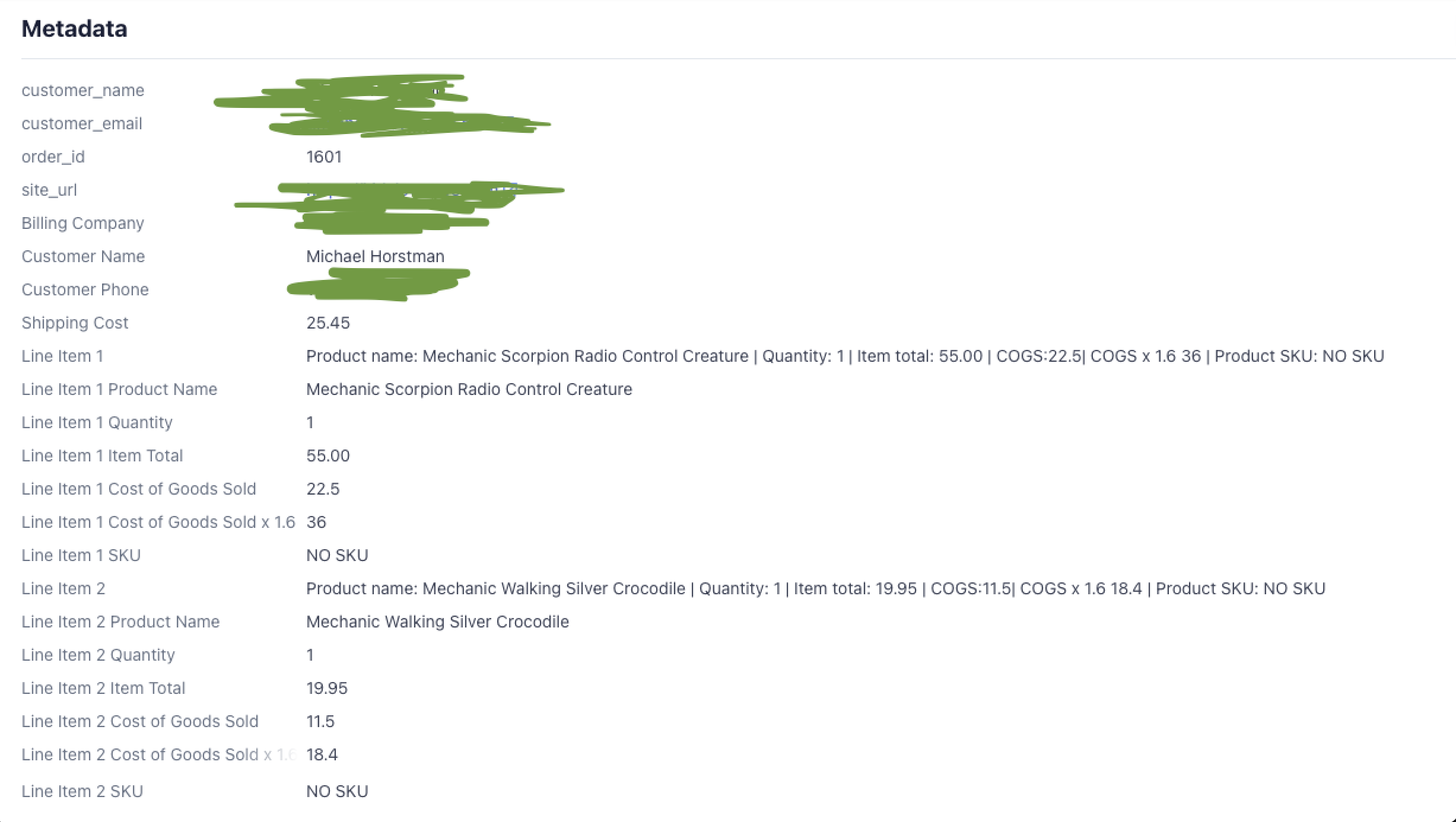
This code example pulls an order and uses the pre-built functions of WP and Woocommerce I mentioned earlier to gather data about the order. I created a function called "wbdc_filter_wc_stripe_payment_metadata".
What happens with this code
When a user makes an order, this function loops through the order (foreach loop) and creates dynamic values for each variable, based on what the customer ordered. It is then stored as "$metadata" and sent to Stripe when the payment-intent object is created.
The full setup includes: Stripe, Woocommerce, and Woocommerce Cost of Goods. You can set the cost of goods individually for each product, and when a customer makes an order, you can pass that data along. to wherever you want.
I hope this helps, as your question is pretty broad. If you want more info on Woocommerce function calls, that would be a great place to start: https://docs.woocommerce.com/document/bundles/bundles-functions-reference/
As far as any good business goes, you NEED to know your numbers. Whether it's paper or cars, you should know exactly what that product cost, and how much money you make (your margins). Knowing these numbers will also help with programming and grabbing the data on any products a customer orders. Best of luck!
function wbdc_filter_wc_stripe_payment_metadata( $metadata, $order, $source ) {

    /**
     * Get order data
     */
    $order_data = $order->get_data();
    $metadata[ __( 'Billing Company', 'woocommerce-gateway-stripe' ) ] = sanitize_text_field( $order_data['billing']['company'] );
    $metadata[ __( 'Customer Name', 'woocommerce-gateway-stripe' ) ] = sanitize_text_field( $order_data['billing']['first_name'] . ' ' . $order_data['billing']['last_name'] );
    $metadata[ __( 'Customer Phone', 'woocommerce-gateway-stripe' ) ] = sanitize_text_field( $order_data['billing']['phone'] );

    /**
     * List products purchased
     */
    $count = 1;
    $total_cost = 0;

    foreach( $order->get_items() as $item_id => $line_item ){
        $item_data = $line_item->get_data();
        $product = $line_item->get_product();
        $product_name = $product->get_name();
        $item_quantity = $line_item->get_quantity();
        $item_total = $line_item->get_total();
        $productID = $product->get_id();
        $quantity   = (float) $line_item['qty'];


        $COGS = get_post_meta( $productID, '_wc_cog_cost', true);
        $COGS = $COGS * $quantity;
        $metadata['Line Item '.$count] = 'Product name: '.$product_name.' | Quantity: '.$item_quantity.' | Item total: '. number_format( $item_total, 2 ). ' COGS:'.$COGS;


        $count += 1;
    }


    return $metadata;
}
add_filter( 'wc_stripe_payment_metadata', 'wbdc_filter_wc_stripe_payment_metadata', 10, 3 );
Metadata passed to Stripe