Replace the Variable Price range by the chosen variation price in WooCommerce 3
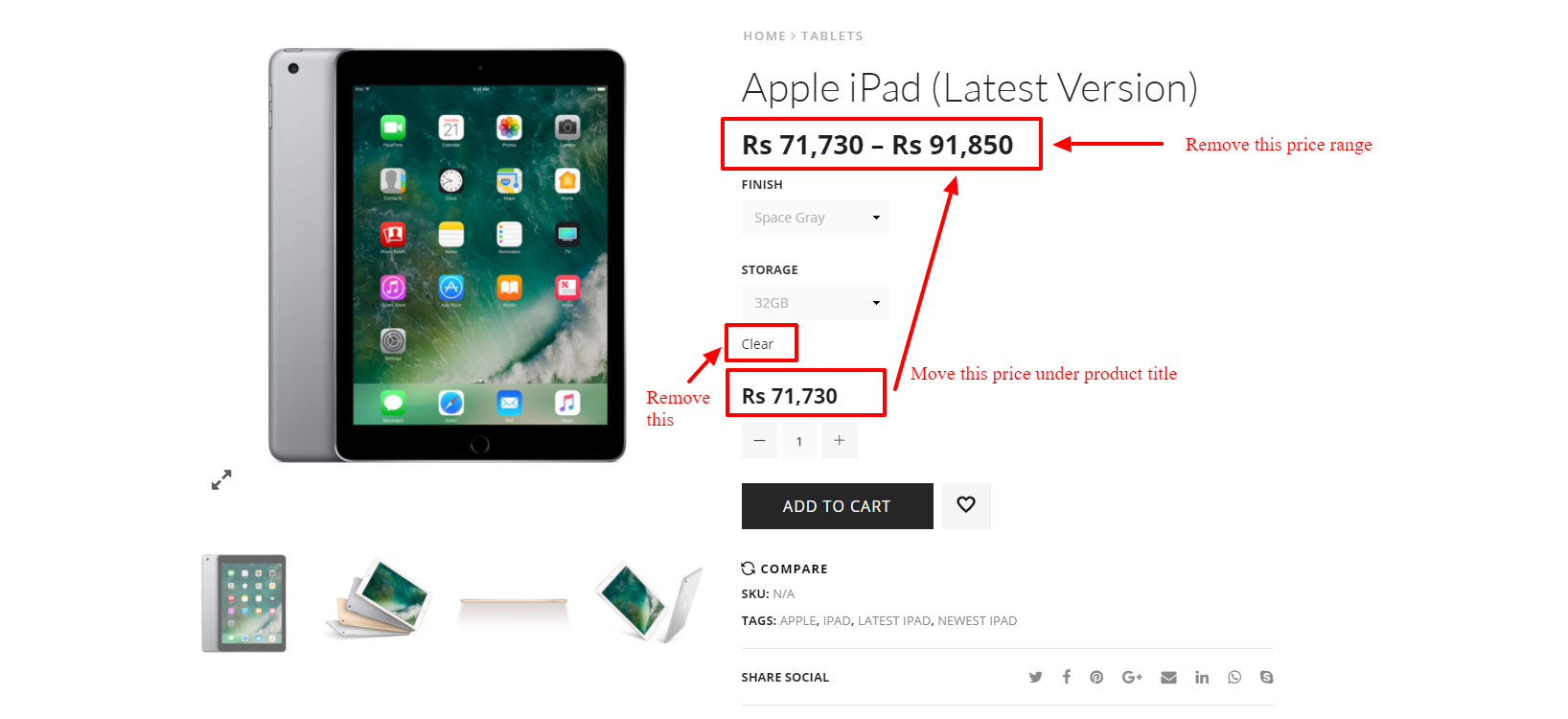
On WooCommerce I would like to change the Variable single product page layout. Because, when you have an variable product you get this wired price rage ( below product title ) in the Variable Product page and it shows in the shop page as well.
For me the standard way is to show the lowest price of the product in the shop as well as product page and change that price according to user selection of variables. I can't believe why.
I can remove the price range and show the lowest price using this code snippet.
https://businessbloomer.com/disable-variable-product-price-range-woocommerce/
But then again, that lowest price doesn't change according to select variables. There are again two prices in the variable product layout. This is my current variable product page layout
http://www.preorders.lk/product/beats-solo3-wireless-on-ear-headphones/
So, can anyone please help to remove the price range from the variable product page and show only one lowest price ( under the product title) of the product as default. So that price should be change according to the variables which that product have. And that lowest price should be show in the shop page as well.
Hope this is clear. Please let me know if anything is unclear. Please refer the attached image for more details.
Thanks.
Solutions
Late to the party but I was looking for a more dynamic/universal solution and less code so I adjusted the answer to the following.
The price is updated based on the variation-form triggers so the styling and original HTML is maintained.
add_action( 'woocommerce_before_single_product', 'move_variations_single_price', 1 );
function move_variations_single_price(){
  global $product, $post;
  if ( $product->is_type( 'variable' ) ) {
    add_action( 'woocommerce_single_product_summary', 'replace_variation_single_price', 10 );
  }
}

function replace_variation_single_price() {
  ?>
    <style>
      .woocommerce-variation-price {
        display: none;
      }
    </style>
    <script>
      jQuery(document).ready(function($) {
        var priceselector = '.product p.price';
        var originalprice = $(priceselector).html();

        $( document ).on('show_variation', function() {
          $(priceselector).html($('.single_variation .woocommerce-variation-price').html());
        });
        $( document ).on('hide_variation', function() {
          $(priceselector).html(originalprice);
        });
      });
    </script>
  <?php
}
Successfully tested with v4.0.1. As long as themes/plugins don't change the markup it should work. If not you can easily change the
priceselector
accordingly.
2021 definitive update
Works for WooCommerce 4+ and 5+ available on:
Replace the Variable Price range by the chosen variation price in WooCommerce 4+
Update (December 2017) : to avoid, Problems regarding non variable products in some themes and a repetition availability bug in some themes
Note: Some plugins like the German Market or some themes will not work with this code, as they make their own changes in the hooks or in the html structure.
This is completely possible.
-
First we remove the unwanted price.
-
We output instead the variable price without the price range and show the lowest price.
- We make a copy of this variable price in a hidden container (to be used/read by our jQuery script)
-
Then we hide the containers of chosen variation price (and the stock availability)
-
With the help of our
jQueryscript, when we get the chosen variation price, we replace the variable price (and display the stock availability). - If the customer change of variation we update the price... If the variation price is not displayed during that change process, our variable price is displayed
Here is that code:
add_action( 'woocommerce_before_single_product', 'move_variations_single_price', 1 );
function move_variations_single_price(){
    global $product, $post;

    if ( $product->is_type( 'variable' ) ) {
        // removing the variations price for variable products
        remove_action( 'woocommerce_single_product_summary', 'woocommerce_template_single_price', 10 );

        // Change location and inserting back the variations price
        add_action( 'woocommerce_single_product_summary', 'replace_variation_single_price', 10 );
    }
}

function replace_variation_single_price(){
    global $product;

    // Main Price
    $prices = array( $product->get_variation_price( 'min', true ), $product->get_variation_price( 'max', true ) );
    $price = $prices[0] !== $prices[1] ? sprintf( __( 'From: %1$s', 'woocommerce' ), wc_price( $prices[0] ) ) : wc_price( $prices[0] );

    // Sale Price
    $prices = array( $product->get_variation_regular_price( 'min', true ), $product->get_variation_regular_price( 'max', true ) );
    sort( $prices );
    $saleprice = $prices[0] !== $prices[1] ? sprintf( __( 'From: %1$s', 'woocommerce' ), wc_price( $prices[0] ) ) : wc_price( $prices[0] );

    if ( $price !== $saleprice && $product->is_on_sale() ) {
        $price = '<del>' . $saleprice . $product->get_price_suffix() . '</del> <ins>' . $price . $product->get_price_suffix() . '</ins>';
    }

    ?>
    <style>
        div.woocommerce-variation-price,
        div.woocommerce-variation-availability,
        div.hidden-variable-price {
            height: 0px !important;
            overflow:hidden;
            position:relative;
            line-height: 0px !important;
            font-size: 0% !important;
        }
    </style>
    <script>
    jQuery(document).ready(function($) {
        $('select').blur( function(){
            if( '' != $('input.variation_id').val() ){
                if($('p.availability'))
                    $('p.availability').remove();
                $('p.price').html($('div.woocommerce-variation-price > span.price').html()).append('<p class="availability">'+$('div.woocommerce-variation-availability').html()+'</p>');
                console.log($('input.variation_id').val());
            } else {
                $('p.price').html($('div.hidden-variable-price').html());
                if($('p.availability'))
                    $('p.availability').remove();
                console.log('NULL');
            }
        });
    });
    </script>
    <?php

    echo '<p class="price">'.$price.'</p>
    <div class="hidden-variable-price" >'.$price.'</div>';
}
Code goes in any php file of your active child theme (or theme) or also in any plugin php file.
This code is tested and works on WooCommerce 3.2.x (should work on WooCommerce 2.6.x too)
You can optionally move the CSS (
<style></style>) to thestyles.cssfile of your active child theme (or active theme) and then remove it from this function…
Related:
- Move the variation price location in WooCommerce
I'm aware that I am resurrecting an old thread here, but something I discovered when using this code is that you need to be aware that with this code as is you risk stopping single, non-variable prices from displaying on some themes as:
remove_action( 'woocommerce_single_product_summary', 'woocommerce_template_single_price', 10 );
is triggered on all product pages, regardless of it being a variable product or not.
You can use the below version which simply checks if the current product is variable or not before running the rest of the code.
    add_action( 'woocommerce_before_single_product', 'check_if_variable_first' );
function check_if_variable_first(){
    if ( is_product() ) {
        global $post;
        $product = wc_get_product( $post->ID );
        if ( $product->is_type( 'variable' ) ) {
            // removing the price of variable products
remove_action( 'woocommerce_single_product_summary', 'woocommerce_template_single_price', 10 );

// Change location of
add_action( 'woocommerce_single_product_summary', 'custom_wc_template_single_price', 10 );
function custom_wc_template_single_price(){
    global $product;

// Variable product only
if($product->is_type('variable')):

    // Main Price
    $prices = array( $product->get_variation_price( 'min', true ), $product->get_variation_price( 'max', true ) );
    $price = $prices[0] !== $prices[1] ? sprintf( __( 'From: %1$s', 'woocommerce' ), wc_price( $prices[0] ) ) : wc_price( $prices[0] );

    // Sale Price
    $prices = array( $product->get_variation_regular_price( 'min', true ), $product->get_variation_regular_price( 'max', true ) );
    sort( $prices );
    $saleprice = $prices[0] !== $prices[1] ? sprintf( __( 'From: %1$s', 'woocommerce' ), wc_price( $prices[0] ) ) : wc_price( $prices[0] );

    if ( $price !== $saleprice && $product->is_on_sale() ) {
        $price = '<del>' . $saleprice . $product->get_price_suffix() . '</del> <ins>' . $price . $product->get_price_suffix() . '</ins>';
    }

    ?>
    <style>
        div.woocommerce-variation-price,
        div.woocommerce-variation-availability,
        div.hidden-variable-price {
            height: 0px !important;
            overflow:hidden;
            position:relative;
            line-height: 0px !important;
            font-size: 0% !important;
        }
    </style>
    <script>
    jQuery(document).ready(function($) {
        $('select').blur( function(){
            if( '' != $('input.variation_id').val() ){
                $('p.price').html($('div.woocommerce-variation-price > span.price').html()).append('<p class="availability">'+$('div.woocommerce-variation-availability').html()+'</p>');
                console.log($('input.variation_id').val());
            } else {
                $('p.price').html($('div.hidden-variable-price').html());
                if($('p.availability'))
                    $('p.availability').remove();
                console.log('NULL');
            }
        });
    });
    </script>
    <?php

    echo '<p class="price">'.$price.'</p>
    <div class="hidden-variable-price" >'.$price.'</div>';

endif;
}

        }
    }
}