I can't get the domain mapping working for a Wordpress blog deployment on the Google Cloud

I've followed this tutorial here. There are two options mentioned in the tutorial 1. WordPress Bitnami instructions and 2. WordPress Click-to-deploy instructions. I used the second option because that appears easiest to do. I followed other tutorials to do domain mapping management and it works for my main website but for some reason not for the blog. It actually looks like the administration steps taken below led Google to do some mapping automatically:
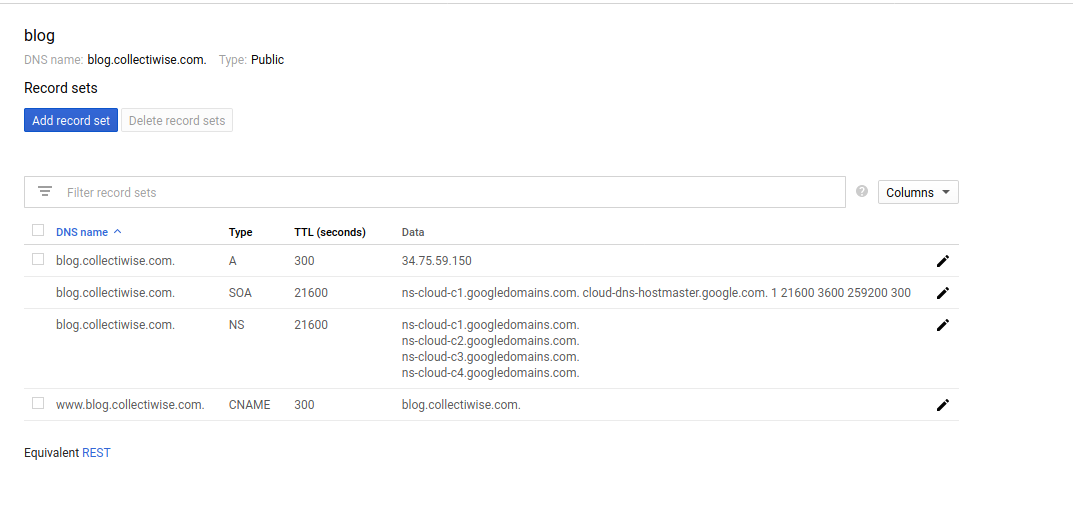
enter image description here

In these instructions of the tutorial I followedr, you go to the wp-admin page and that works fine and Wordpress is installed perfectly well and humming along. Then it says to simply add your domain address with www. and .com in a form (Settings > General) (in my case, www.blog.collectiwise.com). I did that and a message appeared that the new setting was now saved, in green, so I assumed now I can go to my website and see the WP blog stem, but unfortunately I'm redirected to a Virgin Media page that says it can't find "www.blog.collectiwise.com". What am I missing?

Solutions

You have created a subdomain zone, as per whois your domain "collectiwise.com" is using:

ns-cloud-b1.googledomains.com
ns-cloud-b2.googledomains.com
ns-cloud-b3.googledomains.com
ns-cloud-b4.googledomains.com

Since this is different from your whois info, I assume you are managing collectiwise.com and blog.collectiwise.com separately, so there are 2 options:

  1. Create blog.collectiwise.com and www.collectiwise.com in the same zone you already have for collectiwise.com .

or

  1. If you want to handle DNS zones separately then you must add the following NS registries to your main TLD domain collectiwise.com for blog.collectiwise.com :

    ns-cloud-c1.googledomains.com ns-cloud-c2.googledomains.com ns-cloud-c3.googledomains.com ns-cloud-c4.googledomains.com

That way clients requesting any DNS information such as blog.collectiwise.com will be redirected by your TLD domain into your GCP public DNS subdomain zone.

Similar questions

Can I use WP's built in domain mapping with WP installed on a sub-domain?
I have WP MU installed on a subdomain, my.example.com. When I use WP's built in domain mapping, I receive a 404 when I try to view a network site's home page, e.g: www.example2.org. Can I use WP's built in domain mapping with WP installed on a sub-domain?
I want to publish my wordpress website (blog.domain.com) under my nginx website (domain.com) as domain.com/blog
I want to publish my wordpress website (blog.domain.com) under my nginx website (domain.com) as domain.com/blog. I want my website to work under domain.com/blog
How can I create post title cloud (instead of tag cloud) in Wordpress?
I want to create a cloud of titles of the existing posts. Just like a tag cloud as seen in the following image, but there must be post titles instead of tags. How can I do this? http://news.techgenie.com/files/Tag-Cloud1.jpg
How to Force WWW. in Domain With WordPress MU Domain Mapping Plugin?
I created a thread (How to make www. and no www. Go to same site, for all sites?) in the support forums for the WordPress plugin: WordPress MU Domain Mapping. Everything is fine and dandy. I have a base domain, along with several other domains. I have added all of the domains successfully. However, I get www.domain.com and domain.com to work, but t...
WordPress multisite with domain mapping and virtual host on local with fake domain
I have searched all over and have found many tutorials on how to set up a multisite, domain mapping, and even use virtual hosts on my local machine, but I can't seem to find how to do all of those. I would like to have WordPress multisite run on my localhost using fake domain names, such as mysite-1.dev, mysite-2.dev, mysite-3.dev, etc. I'm running...
Wordpress image slider on Google App Engine can't access images on Google Cloud Storage
I have set up a Wordpress web site using the Customizr theme, including an image slider. Everything works perfectly on my local computer, but when I deploy to Google App Engine (GAE), the images aren't displayed in the slider. I have uploaded them, and I can see them in the wp-admin Media section. They are stored on Google Cloud Storage with URLs l...

Also ask

We use cookies to deliver the best possible experience on our website. By continuing to use this site, accepting or closing this box, you consent to our use of cookies. To learn more, visit our privacy policy .