How to install Imagick or resolve issue

I am running Site on Wordpress latest version. when I do Site health Check it gives me following errors,

The WordPress Hosting Team maintains a list of those modules, both recommended and required, in the team handbook (opens in a new tab).

Warning The optional module, imagick, is not installed, or has been disabled.

I search and try to install but failed, I tried to install via SSH using @cheapreplicablades.com [~]# /opt/cpanel/ea-php70/root/usr/bin/pecl install imagick

WARNING: channel "pecl.php.net" has updated its protocols, use "pecl channel-update pecl.php.net" to update

downloading imagick-3.4.4.tgz ...

Starting to download imagick-3.4.4.tgz (253,434 bytes) .....................................................done: 253,434 bytes ERROR: failed to mkdir /opt/cpanel/ea-php70/root/usr/share/doc/pecl/imagick/examples

I don't know what to do, if anyone know kindly help me.

Solutions

You need to install imagick and reload Apache2.

On Debian/Ubuntu, do the following:

$ sudo apt install php-imagick
$ sudo systemctl reload apache2

If you run the PHP-FPM service, you also need to restart PHP-FPM service for Apache.

There is a more extensive treatment, covering other environments (including cPanel), in the WordPress.org support forum.

It seems as though you dont have the required permissions to install this PHP extension . This is often the case when youre using shared hosting. The best option is to contact your hosting provider and ask them to install this php extension. However if they provide you with a cpanel dashboard you may be able to do it yourself, heres how:

  1. Log into your cpanel Cpanel Login

  2. Select your php version, usually under the software section of cpanel Select PHP Version

  3. Select the imagick option and then your options should be saved Select Imagick
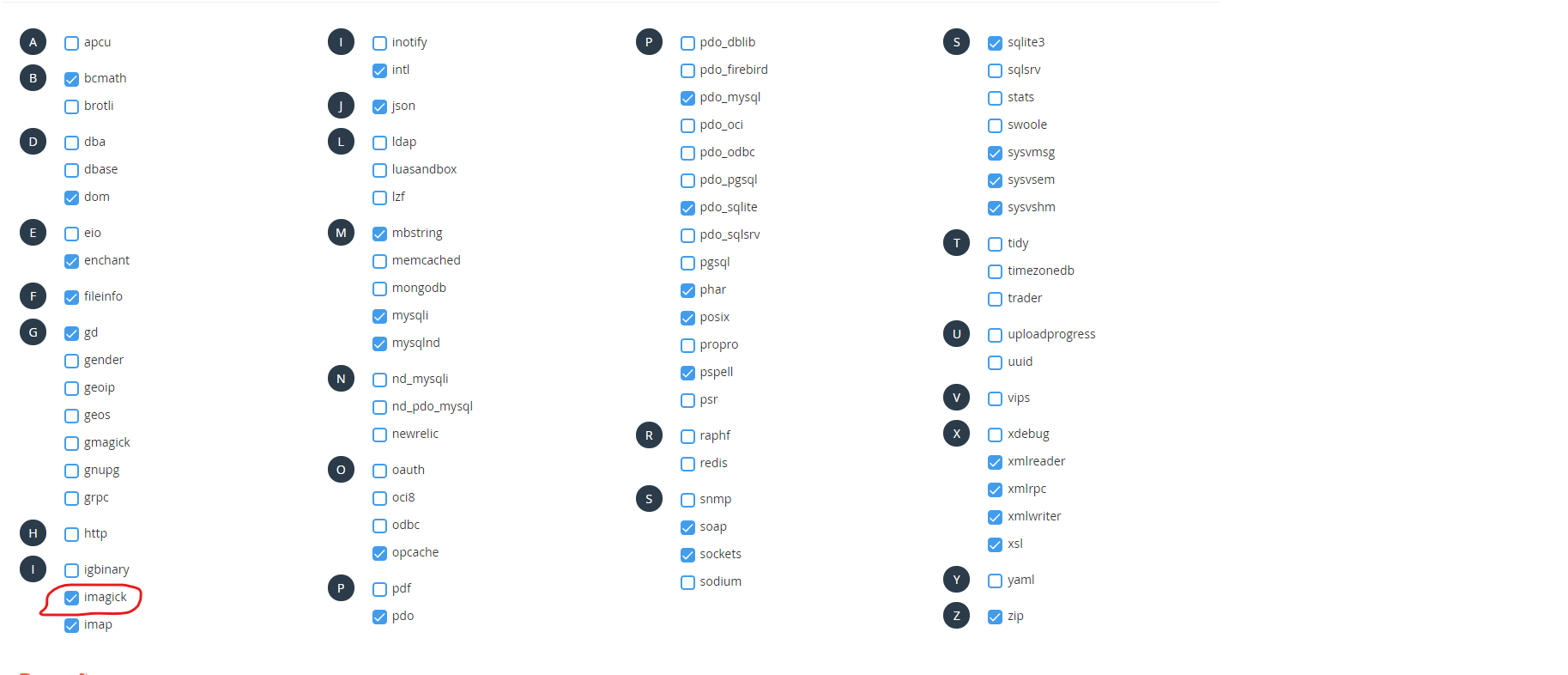
And that's the last step. If you don't have cPanel your best solution is to contact your hosting provider. If it is a self hosted server you will need to contact the server admin to install the php extension for you. I hope this helps!!

Tags: Images

Similar questions

Help! ERROR: Cookies are blocked due to unexpected output on attempting to login to resolve an issue with my site
First-timer over here! Domain for the buggered website (you'll see what I mean!) http://www.clarkephotographic.co.uk/ URL I am using to try to login to WordPress backend to fix the issue http://www.clarkephotographic.co.uk/wp-login.php So, when I enter my username, password and then proceed to login, I get the following error message "ERROR: C...
Can't get URL to resolve...htaccess, mod_rewrite, wordpress issue
I'm having an issue with a rewrite. I have a Wordpress install in my /blog directory, but I want the Wordpress Pages to appear outside of the blog directory. So, in my root .htaccess I added a line: (The first three lines were already there for redirecting everything to "www" I then changed the display URL within Wordpress to my root URL, and alter...
How To resolve server configuration issue
In top of my dashboard showing two errors... Warning: An unexpected error occurred. Something may be wrong with WordPress.org or this server’s configuration. If you continue to have problems, please try the support forums. (WordPress could not establish a secure connection to WordPress.org. Please contact your server administrator.) in /public_html...
How do I resolve the ngRoute issue with Angularjs in WordPress?
I'm writing a plugin that uses Angularjs. I've loaded Angularjs and ngRoute locally: I have angularjs listed as a dependency for ngRoute so Angular loads first. However, I still get the error that says it's not loading: Error: [$injector:nomod] Description This error occurs when a module fails to load due to some exception. The error message above ...
How can I resolve the 'Fatal error: Call to a member function is_on_sale() on a non-object' issue?
I have created a WordPress Theme, with WooCommerce functionality. However, I am having problems in generating the Basket page. When on said page, I receive the following error: Fatal error: Call to a member function is_on_sale() on a non-object in /var/www/vhosts/example.com/httpdocs/wp-content/plugins/woocommerce/templates/single-product/sale-flas...
WordPress Install Issue, Receive Warnings But Successful Install
I get the following warning on my installation. It installs successfully but I'm not sure whether or not these issues are vital to my blog. I'm using IIS, anyone know why I'm having these issues and what I can do to get rid of these errors? Warning: unlink(C:\Inetpub\wwwroot\bozack/5505560414c7fd72a81f63.tmp) [function.unlink]: Permission denied in...

Also ask

We use cookies to deliver the best possible experience on our website. By continuing to use this site, accepting or closing this box, you consent to our use of cookies. To learn more, visit our privacy policy .