How can I Update my Theme
I Just want to know how can I update my Wordpress theme manually on live site. Actually I am using plugin called "WP Total Cache" My entire website styles is messed up when I try to update wordpress theme via ftp.
Any suggestions please ?
Solutions
If you're updating the theme design but are not able to see the live changes and as you wrote, messed up design, you should purge the WP Total Cache.
For that go to WP Total Cache and click on 'Delete Cache' or any similar option.
Also, be sure to check the validity of your browser cache. You can check that in your .
htaccess file
.
If you've modified the theme's built-in stylesheet, then any changes would be overwritten when you update the theme.
If that's the case, you have a choice: either don't update the theme, or move your modifications to any type of CUSTOM CSS area that the theme may provide.
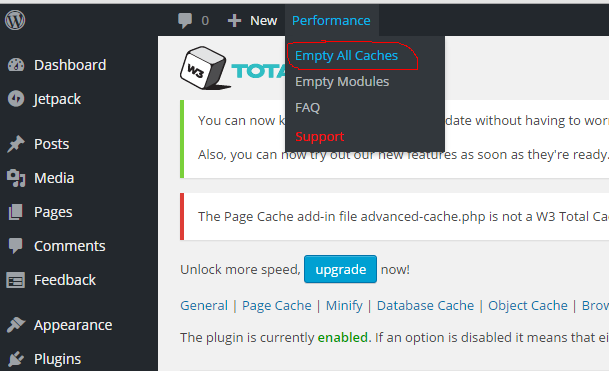
I think you mean "W3
Total Cache
".
GoTo admin panel hover on performance -> click on empty all caches.
I think this may help you.
And make sure all files have same name.
Similar questions
Child theme breaks after update of master theme
I have a theme, lets call it Master. I manually created a child theme, lets call in Master-Child and added some files into it. All worked well until a notification came that I should update the Master because of a new version. The child theme has failed to work since. I get an error message "Master theme does not exist" although "Master" is activat...
Theme options not displaying correctly after theme update
I am redesigning a theme options panel but when I present to a client, the display is not exactly the same with the one I made. I investigate on this problem and it seems that he is actually seeing a part of the old version of the theme options panel so a full clearing of the browser cache should solve the problem. I have replicate his issue and cl...
Custom theme being prompted for update because of similarly named theme
I've got a custom made theme named "Discovery 2014" on my site and it keeps getting flagged for an update because of a free theme named "Discovery" available via the theme repository. Definitely not my theme, of course. Is there anyway to disable this? I was thinking I might just crank up the version number to like 30 or something that the public t...
Also ask