Class cannot be found, but it's available in the file, I get: Fatal Error: Uncaught Error: Class 'Blocks\Base\Activation' not found

Class cannot be found, but the declaration is correct. Here is my code:

Info-Wheel.php

if ( file_exists( dirname( __FILE__ ) . "/vendor/autoload.php" ) ) {
  require_once dirname( __FILE__ ) . "/vendor/autoload.php";
}


use Blocks\Base\Activation;
use Blocks\Base\Deactivation;
/**
 * The code that runs during plugin activation
 */
function iw_activate_plugin() {
>>  Activation::activate();
}
/**
 * The code that runs during plugin deactivation
 */
function iw_deactivate_plugin() {
  Deactivation::deactivate();
}
/**
 * Register Hooks for deactivation and activation
 */
register_activation_hook( __FILE__, "iw_activate_plugin" );
register_deactivation_hook( __FILE__, "iw_deactivate_plugin" );
/**
 * If class exists run it
 */
if ( class_exists( "Inc\\Init" ) ) {
  Blocks\Init::register_services();
}
Activation.php

 /**
  * Remove rewrite rules and then recreate rewrite rules.
  */
 class Activation {
  public static function activate() {
    flush_rewrite_rules(  );
   }
 }

I use composer, so I can use namespaces. Here is an image of my folder structure:
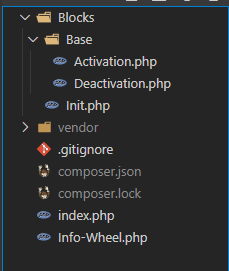
Folder Structure

In my opinion, the class Activation should be found and executed, but somehow WordPress can't find it? I have checked the names and copy-pasted them, just to be sure they're the same. I marked line 56 with a double arrow.

Here is the full error message:


Fatal error: Uncaught Error: Class 'Blocks\Base\Activation' not found in D:\Programme\MAMP\htdocs\wordpress\wp-content\plugins\Info-Wheel\Info-Wheel.php:56
Stack trace:
#0 D:\Programme\MAMP\htdocs\wordpress\wp-includes\class-wp-hook.php(287): iw_activate_plugin('')
#1 D:\Programme\MAMP\htdocs\wordpress\wp-includes\class-wp-hook.php(311): WP_Hook->apply_filters('', Array)
#2 D:\Programme\MAMP\htdocs\wordpress\wp-includes\plugin.php(478): WP_Hook->do_action(Array)
#3 D:\Programme\MAMP\htdocs\wordpress\wp-admin\plugins.php(193): do_action('activate_Info-W...')
#4 {main} thrown in D:\Programme\MAMP\htdocs\wordpress\wp-content\plugins\Info-Wheel\Info-Wheel.php on line 56

Edit: Here is a line from the autoloader:

"autoload": {
      "psr-4": {"Blocks\\": "./Blocks"}
  }

Solutions

It was a caching problem with composer.

I retroactively changed my composer.json , so I had to open my terminal and run composer dumpautoload to correct the cache.

Similar questions

Fatal error: Uncaught Error: Cannot use object of type WP_Error as array in /../plugins/rm-payment.php
I using remote payment system of 2 WordPress site, 1st WordPress site to 2nd WordPress site. 1st is main website & 2nd website work like merchant website that process payment of paypal. We fetch user order details of 1st website to 2nd website for process paypal payment. But on fetching web page of 2nd website getting error, but remember it sol...
PHP Fatal error: Uncaught Error: Cannot access property started with '\\0'
So I'm using Timber v0.22.5. I have it currently running on my local and a dev environment right now. Everything is running great no issues. Both environments are running PHP 5.5.9. I just migrated it to my production server which is running PHP 7.0. I am now getting the following error from Timber. Fatal error: Uncaught Error: Cannot access proper...
Fatal error: Uncaught Error: Cannot use object of type WP_Error as array
Am trying to fetch user data from wordpress table. When I put the data into an array it shows me an fatal error. This is my php code: Its showing the fatal error Cannot use object of type WP_Error as array in last line $userdata[]. Any help would be appreciated. Thanks in advance.
Error in the wp-config.php file: PHP Fatal error: Uncaught Error: Unknown named parameter (PHP 8.0)
I get the following error: Can anyone please advise on this? I am using the wpforms plugin and even after I have disabled all plugins, I still have this error in the error log. Just for your information, I have implemented this tutorial to send emails without the STMP plugin. I receive emails and everything looks fine except that the theme shakes b...
Gutenberg: Restrict Top Level Blocks, But Not Child Blocks
I've created a custom top level "page section" block, to work with my existing theme. I've like to restrict top level blocks to ONLY that one block. However, I don't want to disable all blocks completely, because I want all blocks available to use as innerBlocks. How can I restrict top level blocks, without restricting child level blocks?
5 PHP Fatal error: Uncaught ArgumentCountError (Cannot Find)
I recently migrated a WordPress site over from PHP5 to PHP7. One of our custom file listing functions (outputs a listing of files from a folder on a server directory) is failing on the new server on PHP7. I know there is an argument conflict but I cannot figure out how to rectify it. The error: 5 PHP Fatal error: Uncaught ArgumentCountError: Too fe...

Also ask

We use cookies to deliver the best possible experience on our website. By continuing to use this site, accepting or closing this box, you consent to our use of cookies. To learn more, visit our privacy policy .