Adding class to the parent of current-post-ancestor / current-menu-parent / current-post-parent
Following situation:
I have a drop down menu. At the moment we are located on a single post of the category "Produkt Design"
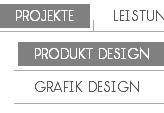
Its class in the menu is
menu-item menu-item-type-taxonomy menu-item-object-category current-post-ancestor current-menu-parent current-post-parent menu-item-145
The parent to whom I want to apply a special styling, since it is the parent of the active menu entry, has the following classes
menu-item menu-item-type-taxonomy menu-item-object-category menu-item-has-children menu-item-151
How can I make to get a special class to show in parent?
See demo of the menu here

Solutions
You can add
css classes
to a menu item in the word press menu graphic interface.
Either add the class to the parent or to the menu item then use css parent.
Similar questions
How to hightlight all ancestor menu items of a child page NOT displayed in menu
Here's the situation: In my main navigation menu I have something that looks like this: Where the Latest Projects page is a child page and sub menu item of the Work With Me page and both are displayed in the main navigation. However, I have multiple Project pages that are only child pages of Latest Projects. I decided not to display them in the men...
Show menu based on parent & ancestor
Trying to show a wp menu based on parent. Works great on parent / child pages, but on grandchildren pages its failing. How should i restructure the menu selector to include the sub nav menu based on the main parent? ?>
How to get current page menu item ancestor name wordpress
I would like to know how to retrieve as variable the name of the current page. For exemple, My menu is like : Item 1 & 2 are custom links. sub-item1 is my page. When I'm on this page, I want to retrieve "Item 2" name (to build my custom breadcumbs) Thanks
Highlighting wp_nav_menu() Ancestor Class w/o Children in Nav Structure?
(Moderators note: Was originally titled "wp_nav_menu Ancestor class without children in navigation structure") I have a wp_nav_menu in my header which had three pages in it. When I am on one of those pages, the li containing that page in the menu gets the class .current_page_item. These three pages have templates, and these templates contain custom...
Echo top most parent (ancestor) category of a post
My site has the following structure I have a post called "Pits", and Pits is in both the categories Apples, and Oranges. In my theme, I would like to echo only the top most parent category "Fruits". I have tried countless codes but they all seem to only echo the first category parent, and not go one level higher.
wp_list_pages, hide parent with no ancestor and show children to chosen post
I'am trying to create a menu using wp_list_pages and I want the end result to look like this: I am using the following code, and I cant figure out how to modify it to give me the result I want. The example above gives me a layout looking like this and it shows the parent with no ancestor and not the sibling to the clicked Children: Appreciate any h...
Also ask